
ONE PLATFORM FOR EVERY ROLE
A professional experience parents notice
A professional experience parents notice
Family Profiles keep parent and child information organized in one place. Automatic pickup/drop-off alerts, digital invoices, and a clean parent app replace phone calls and paper - the kind of polish that turns first-time families into long-term customers.
Family Profiles keep parent and child information organized in one place. Automatic pickup/drop-off alerts, digital invoices, and a clean parent app replace phone calls and paper - the kind of polish that turns first-time families into long-term customers.
ONE PLATFORM FOR EVERY ROLE
A professional experience parents notice
Family Profiles keep parent and child information organized in one place. Automatic pickup/drop-off alerts, digital invoices, and a clean parent app replace phone calls and paper - the kind of polish that turns first-time families into long-term customers.
A More Convenient Ride Experience for Parents
Give parents a practical mobile app for handling routine transportation tasks. They can request rides, review schedules, make payments, add pickup and drop-off notes, contact the transportation office, receive arrival updates, and view the assigned vehicle on a map.
Ride Requests Without Long Message Threads
Parents can request transportation through the app instead of arranging each ride across phone calls, texts, and paper forms. This also reduces manual request entry and follow-up work for your office team.
Ride Schedules Close at Hand
Parents can review their child’s scheduled ride dates, pickup and drop-off times, locations, and ride status from their phones. They have a useful reference without searching through previous messages.
Helpful Vehicle Arrival Updates
Notifications let parents know when the assigned vehicle is approaching. Families can prepare their child for pickup while your office receives fewer calls asking when the driver will arrive.
Vehicle Location on the Map
Parents can view their child’s assigned van or car on a map during an active trip. This provides useful context when preparing for pickup or waiting for drop-off.
Pickup and Drop-Off Instructions
Parents can add notes for specific ride arrangements, such as an approved adult, alternate entrance, or temporary pickup instruction. Drivers and administrators can refer to the information connected to the child’s ride.
Direct Access to the Transportation Office
Parents can message the administrator about ride requests, schedule questions, or transportation updates. This reduces scattered conversations across personal phone numbers and unrelated message threads.
Payments Without Paper Follow-Up
Parents can handle transportation payments through the app rather than relying on paper notices or separate payment arrangements. Your office team can spend less time sending individual payment reminders.
Child and Ride Information in the App
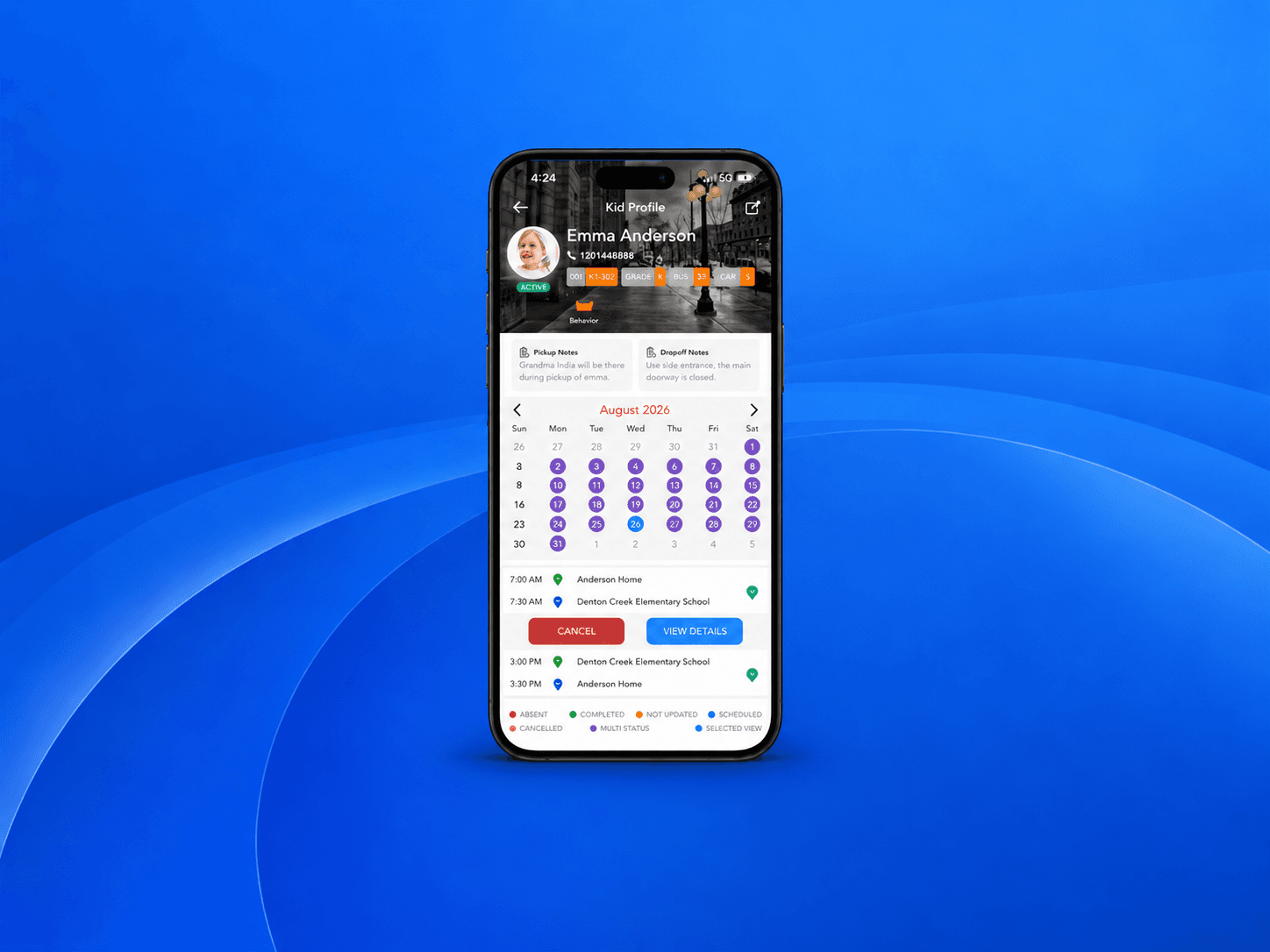
The child profile and ride calendar give parents a useful reference for transportation schedules, ride notes, and current status. Families have the information they need without repeatedly contacting the office.

A More Convenient Ride Experience for Parents
Give parents a practical mobile app for handling routine transportation tasks. They can request rides, review schedules, make payments, add pickup and drop-off notes, contact the transportation office, receive arrival updates, and view the assigned vehicle on a map.
Ride Requests Without Long Message Threads
Parents can request transportation through the app instead of arranging each ride across phone calls, texts, and paper forms. This also reduces manual request entry and follow-up work for your office team.
Ride Schedules Close at Hand
Parents can review their child’s scheduled ride dates, pickup and drop-off times, locations, and ride status from their phones. They have a useful reference without searching through previous messages.
Helpful Vehicle Arrival Updates
Notifications let parents know when the assigned vehicle is approaching. Families can prepare their child for pickup while your office receives fewer calls asking when the driver will arrive.
Vehicle Location on the Map
Parents can view their child’s assigned van or car on a map during an active trip. This provides useful context when preparing for pickup or waiting for drop-off.
Pickup and Drop-Off Instructions
Parents can add notes for specific ride arrangements, such as an approved adult, alternate entrance, or temporary pickup instruction. Drivers and administrators can refer to the information connected to the child’s ride.
Direct Access to the Transportation Office
Parents can message the administrator about ride requests, schedule questions, or transportation updates. This reduces scattered conversations across personal phone numbers and unrelated message threads.
Payments Without Paper Follow-Up
Parents can handle transportation payments through the app rather than relying on paper notices or separate payment arrangements. Your office team can spend less time sending individual payment reminders.
Child and Ride Information in the App
The child profile and ride calendar give parents a useful reference for transportation schedules, ride notes, and current status. Families have the information they need without repeatedly contacting the office.
A More Convenient Ride Experience for Parents
Give parents a practical mobile app for handling routine transportation tasks. They can request rides, review schedules, make payments, add pickup and drop-off notes, contact the transportation office, receive arrival updates, and view the assigned vehicle on a map.
Ride Requests Without Long Message Threads
Parents can request transportation through the app instead of arranging each ride across phone calls, texts, and paper forms. This also reduces manual request entry and follow-up work for your office team.
Ride Schedules Close at Hand
Parents can review their child’s scheduled ride dates, pickup and drop-off times, locations, and ride status from their phones. They have a useful reference without searching through previous messages.
Helpful Vehicle Arrival Updates
Notifications let parents know when the assigned vehicle is approaching. Families can prepare their child for pickup while your office receives fewer calls asking when the driver will arrive.
Vehicle Location on the Map
Parents can view their child’s assigned van or car on a map during an active trip. This provides useful context when preparing for pickup or waiting for drop-off.
Pickup and Drop-Off Instructions
Parents can add notes for specific ride arrangements, such as an approved adult, alternate entrance, or temporary pickup instruction. Drivers and administrators can refer to the information connected to the child’s ride.
Direct Access to the Transportation Office
Parents can message the administrator about ride requests, schedule questions, or transportation updates. This reduces scattered conversations across personal phone numbers and unrelated message threads.
Payments Without Paper Follow-Up
Parents can handle transportation payments through the app rather than relying on paper notices or separate payment arrangements. Your office team can spend less time sending individual payment reminders.
Child and Ride Information in the App
The child profile and ride calendar give parents a useful reference for transportation schedules, ride notes, and current status. Families have the information they need without repeatedly contacting the office.
Explore the Platform

Explore the Platform
Explore the Platform
Ready to run a more professional transportation business?
See how KidShuttle handles dispatch, driver safety, and billing - all in one walkthrough with our team. Live in days, not months.



Ready to run a more professional transportation business?
See how KidShuttle handles dispatch, driver safety, and billing - all in one walkthrough with our team. Live in days, not months.